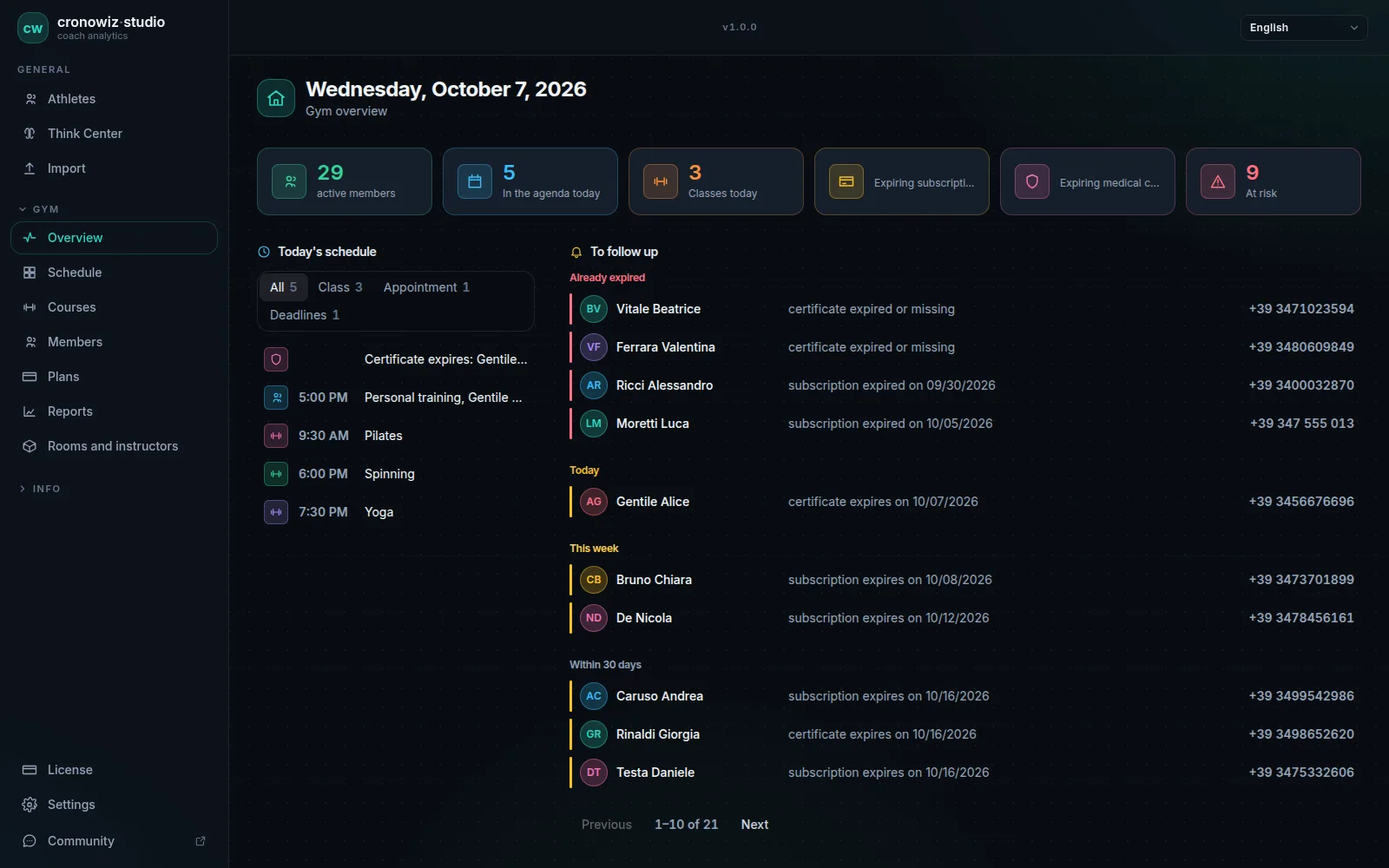
Most gym software sold today is a website. You open a browser, log in and work on data stored in the vendor’s data centre. That works as long as the line is up and the subscription is paid. When the connection drops, the front desk cannot see whose membership has expired, who is booked into the 6 pm class or whether the person at the door is allowed in.
Studio is built the other way round. It is a desktop program for Windows 10/11 and 64-bit Linux, with a single database on the gym’s computer, so working offline is its normal state, not an emergency mode. There is no account to create, and member data never passes through any server. The everyday work of the gym, from the first check-in of the morning to the monthly report, does not need a connection.
The price is €199 once, with no subscription, including every update to the major version you buy. It covers what a front desk does every day: member records and medical certificates, selling and renewing memberships and entry passes, suspensions, a schedule with capacity and a waiting list, check-ins with a QR card or PIN, a daily list of who is expiring, and monthly reports.
Offline vs cloud gym management software
| Offline software (cronowiz Studio) | Typical cloud gym software | |
|---|---|---|
| Where member data lives | In a database file on the gym’s computer | On the vendor’s servers |
| When the internet is down | Everything keeps working, check-ins included | Depends on the vendor: many stop, some keep a temporary copy until the line is back |
| Account | None | An online account with the vendor |
| Price | €199 once, no subscription | Usually a monthly fee, often by number of members |
| Backups | Your job: a file you copy to a USB stick or drive | Handled by the vendor |
| Several computers on the same data | Yes, linked to the gym PC, also from home over a VPN; one licence per computer | Usually yes |
| Member app, online booking, card payments | No | Often included |
-
No internet needed day to day
members, memberships, schedule, check-ins and reports all work with the line down.
-
Check-ins over the local network
an entrance tablet talks to the PC on the gym’s own Wi-Fi, not over the internet.
-
One file, on your computer
all data in a local database, with full backup and exact restore from the settings.
-
Windows and Linux
installer for Windows 10 and 11, AppImage and .deb for 64-bit Linux.
-
No account
the licence server only receives an anonymous fingerprint of the computer, no gym data.
-
€199 once
no monthly fee and no per-member charge; updates to your major version included.
What works offline, and what needs the internet
The internet is needed for four things only: buying and activating the licence; downloading updates, which the program looks for at launch and simply skips when there is no connection; moving the licence to another computer, which needs the old one online; and, on the training side, route maps and receiving data from athletes’ phones. All of the gym’s daily work runs with the router unplugged:
- member records, contact details, notes and medical certificates with their expiry dates
- selling, renewing, suspending and cancelling memberships, entry passes included
- the schedule: recurring classes by room and instructor, places, waiting list, no-shows and appointments
- check-ins at the front desk by name, PIN or QR scanner, and on an entrance tablet over the local network
- the daily overview of memberships and certificates expired or expiring, with phone numbers alongside
- monthly reports, the list of members at risk of leaving, and CSV export
- full backup and restore
Check-ins when the internet is down
Every member gets a QR code and a six-digit PIN, created automatically and printable as a card. At the front desk you type the name or the PIN, or scan the card: a USB QR scanner works like a keyboard, so there is nothing to set up. The result shows in large type, in green or red. Members who are not in order are flagged, and the decision stays with your staff.
For self check-in, an Android tablet or an iPad at the entrance connects to the front-desk PC over the gym’s own Wi-Fi or wired network, with no internet involved. Members show their QR to the camera or type their PIN. If the PC is switched off or the network drops, the tablet queues the passes and sends them, with the right time, as soon as the PC is reachable again. This needs the Studio certificate installed on the tablet, a one-off step.
Check-ins can also mark class attendance by themselves: whoever checks in from 30 minutes before a class they booked is marked present. The offline check-in system page goes into the details, and step-by-step instructions are in the check-in and tablet chapter of the manual.
Offline software or cloud software with an “offline mode”?
Some web-based systems advertise an offline mode. In general it means the browser or the app keeps a temporary copy, so the front desk can get through a short outage, and the changes are synced when the line comes back. It helps, but the data still lives on the vendor’s server, you still need an account and a subscription, and what keeps working during the outage depends on the vendor. The wider trade-offs are in cloud vs desktop gym software.
Offline gym management software turns that around: the data lives on your computer and the program does not need a server to work. There is nothing to sync and nothing to wait for. A change in the vendor’s prices does not touch the program you have already paid for, and your data stays where it is. If you are comparing products, these ten questions help tell the two apart.
How it works day to day
You download the file for your system, install it and accept the terms of sale at first launch. You buy the licence inside the program, through Stripe; once payment is done the licence activates by itself, and from then on you no longer need a connection.
In the morning the daily overview shows what needs attention: memberships that have expired, expire today, this week or within 30 days, with phone numbers alongside. During the day you record check-ins, sell and renew memberships, mark class attendance and no-shows, and book one-off appointments. At the end of the month you open the report with active, new and lost members and the renewal rate.

Keeping your data safe when it lives in-house
With offline software, your data is as safe as your computer and your backups. The full backup is a single file, which you can protect with a passphrase and copy to a USB stick, an external drive or a cloud you trust. Restoring brings the database back exactly as it was when the backup was taken. Before every major update the program also keeps its own safety copy of the database.
The licence never holds your data hostage. If it stops being valid on a computer, for example after you move it to a new one, the program goes read-only: you can still view everything and export your data and backups. The details are in the manual, under backup and new computer.
What you need
Studio runs on modest hardware, so the computer already at the front desk usually does the job. Mac is not supported yet.
- a 64-bit PC or laptop with Windows 10 or 11, or 64-bit Linux such as Ubuntu, Debian, Mint or Fedora
- a screen of at least 1024 × 640 pixels; Full HD is ideal
- about 100 MB of disk space, plus your data, usually a few tens of MB
- optional: a USB QR scanner at the front desk, and an Android tablet or iPad with a front camera for self check-in
Who offline gym software is for
It makes the most sense for a gym, studio or personal trainer with one front desk and:
- an unreliable connection: a basement, a rural area, a shared building or a mobile hotspot (see what to do when the gym’s internet goes down)
- no wish to keep members’ health data on someone else’s server
- no appetite for another monthly fee: Studio is €199 once, with no subscription
- a spreadsheet that no longer keeps up with expiry dates, suspensions and bookings
Who it is not for
Studio runs on Windows and Linux PCs: there is no web version, no member app and no online self-booking. Several computers can work on the same data, each with its own licence, but the gym PC has to stay on. It does not take card payments, run recurring billing, control turnstiles or send email and SMS campaigns. If your gym depends on those, a cloud service is the better fit.
Your gym in one program. Your data in your gym.
Windows and Linux · €199 once, no subscription
The questions people usually ask
Is there gym management software that works without internet?
Yes. cronowiz Studio is installed on a Windows or Linux PC and keeps members, memberships, the schedule, check-ins and reports in a database on that computer, so the gym’s daily work does not need a connection.
Do I need the internet to use cronowiz Studio?
Only to buy and activate the licence, to download updates and to move the licence to another computer. Route maps and receiving data from athletes’ phones also need a connection. Everything else works offline.
Can members check in when the internet is down?
Yes. Check-ins at the front desk work offline, and the entrance tablet talks to the PC over the gym’s local network, not the internet. If the PC is off, a tablet with the Studio certificate installed queues the passes and sends them later.
Is it cloud software with an offline mode?
No. It is a desktop program with a local database. There is no copy of your data on a server, and nothing to sync.
Where is the data stored?
In a single database file on the gym’s computer: in %APPDATA%\cronowiz-studio on Windows and in ~/.local/share/cronowiz-studio on Linux. From the settings you can take a full backup and restore it exactly.
What happens if the computer breaks?
Your data is only as safe as your last backup, so keep one off the computer. On a new PC you install Studio, restore the backup and move the licence; if the old computer cannot be switched on, support moves the licence for you.
Can I use it on two computers, say the front desk and the office?
Yes, with a licence for each computer. The gym PC holds the data and stays on; the other one connects to it as a workstation and works on the same members and the same schedule. If the two computers are in different places you need a VPN, such as Tailscale.
Does it run on a Mac?
No. Studio is currently available for Windows 10 and 11 and 64-bit Linux.
Is cronowiz Studio free?
No. It costs €199 once, with no subscription and no per-member charge. The licence is valid forever for the major version you buy, with all its updates.
Can I try it before buying?
The training analysis can be tried free with cw·dashboard in the browser. The gym features are shown in screenshots on the site; for questions before buying, write to info@ypt.ai.